Grill house · charcoal
Braseado
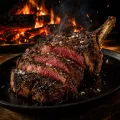
Dry-aged meats and holm oak firewood. A dark look in burgundy and gold, with a cover video.
Open the demo →A QR menu that reads well on a phone and in three languages, where guests can order, call the waiter and pay. The kitchen gets the order instantly, and you change dishes and prices whenever you like.
The menu for their table, with the phone camera and in their language. Nothing to download.
Straight to the kitchen and bar: each order reaches whoever prepares it, in order and paper-free.
The bill from the phone: whole, split or by dish, with a tip if they like.
Each menu has its own logo, colours, photos and dishes. Pick one and try it as if you were sitting at the table.
Dry-aged meats and holm oak firewood. A dark look in burgundy and gold, with a cover video.
Open the demo →Specialty coffee and in-house bakery. Cream and espresso tones, with a calligraphic logo.
Open the demo →A contemporary style: stone, black and cobalt blue, with product photos on a plain background.
Open the demo →A sushi bar with a restrained, dark and typographic Japanese look.
Open the demo →The pizzeria version, for eating in or ordering to take away.
Open the demo →Cobalt-blue maiolica tiles, lemon and whitewash: a pizzeria with a seaside feel.
Open the demo →The menu is what the guest sees. Behind it there are six screens that run on their own, so the floor, the kitchen and you always know what is going on.
Each sees their own orders, in the order they arrive. No more lost tickets.
Which table has ordered, which is calling the waiter and which wants to pay, at a glance.
Change dishes, prices and photos whenever you like. It shows on every table straight away.
Each guest pays the whole bill, an equal share or just their own dishes, and leaves a tip if they like. No waiting for the card machine.
You print the codes from the panel and each one opens the menu for its table. If you change the menu, the printed codes keep working.
At closing time you see how many orders there were, at what times and what sold most, without doing the sums by hand.
Most QR menus are the same old PDF with a code stuck on the table. It opens tiny, you have to zoom in and, if you change a price, you have to reprint the code or upload the file again.
This is something else. Each table has its own code, and when guests scan it they see a menu designed for the phone: photos of the dishes, prices, descriptions and their preferred language, Spanish, Catalan or English. From there they can order, call the waiter or ask for the bill, without downloading any app.
The guest scans the code with their phone camera and goes straight to their table’s menu.
They choose and order. They add dishes to the order and send it. No need to wait for someone to come and take the order.
The order reaches whoever prepares it. The kitchen sees the food and the bar sees the drinks, each on its own screen, in the order they come in.
They ask for the bill and pay. They can pay the whole bill, split it between several people or pay just their share, and leave a tip if they want.
The floor staff have a panel showing the status of every table: who has ordered, who is calling the waiter and who wants to pay. The kitchen and the bar work from their own screens, with no paper tickets getting lost.
And you have a panel to change the menu: dishes, prices and photos. If you change a price or remove a dish, it shows up instantly on every table, with nothing to reprint.
The demos on this page run on the same software underneath and look nothing alike on the outside. A dark grill house with a video of glowing embers, a café in cream tones with a calligraphic logo, another in a modern style in cobalt blue. Each menu carries its own logo, colours, photos and dishes, and is published on the venue’s own domain.
It isn’t a template shared with a hundred other restaurants: it’s your menu.
In the demos, payment is simulated so you can try the whole thing without being charged. In a real venue it connects to the payment gateway of your choice.
If you already use a POS system, the menu can run alongside it from day one. The connection with the POS and with Verifactu invoicing is looked at case by case, because it depends on the software you use.
And if what you need is to fill more tables, not just serve them better, we cover that in marketing for restaurants (in Spanish).
We choose the style. We start from the type of venue and your brand: colours, logo and photos.
We load your menu. Dishes, prices, descriptions and translations, ready for you to review.
We test it on the floor. Codes on the tables, screens in the kitchen and bar, and a trial run with the team before opening.
Spanish, Catalan and English, with photos, prices and descriptions designed to be read on a phone.
Guests order when they want, without waiting for someone to take their order.
Each order reaches whoever prepares it, in the order it comes in and with no paper.
Who has ordered, who is calling the waiter and which table wants to pay, at a glance.
Whole, split between several people or by dish, with a tip if the guest wants.
Change dishes, prices and photos whenever you like, without relying on anyone.
No. They scan the code with their phone camera and the menu opens in the browser.
Yes, from the owner panel. Changes show up instantly on every table.
In the demos, payment is simulated so you can try the whole thing. In your venue it connects to the payment gateway of your choice.
Yes. The menu can run alongside it from day one, and the connection with your POS is looked at depending on the software you use.
Give us your website and within 48 hours we send a clear report on what is holding your sales back and in what order to fix it. Reviewed by a person, not a robot. No commitment.
We are not looking for «profiles». We look for people who do one specific thing well and enjoy doing it well. If you are a freelancer, agency or studio and you fit, let us talk.
We look at everything that comes in. If you fit, we write back; if not, we tell you that too.
We write about marketing, SEO and AI applied to real businesses. When we publish something worth reading, we send it. Not one email more.
If you want the detail: cookie policy · privacy.
Essential for the site to work: remembering your cookie decision and keeping forms secure. Without them the site does not work properly, which is why they cannot be switched off and do not need your permission.
They remember choices you have made so we do not bother you with the same thing twice, such as not showing you a notice you already dismissed.
They tell us in aggregate which pages get visited most and how people arrive, so we can improve the site. They are not used to identify you.
They let us measure how well our ads work and show you relevant advertising on other sites. These are the ones that follow you most: if you do not want them, that is fine.